pir8g33k
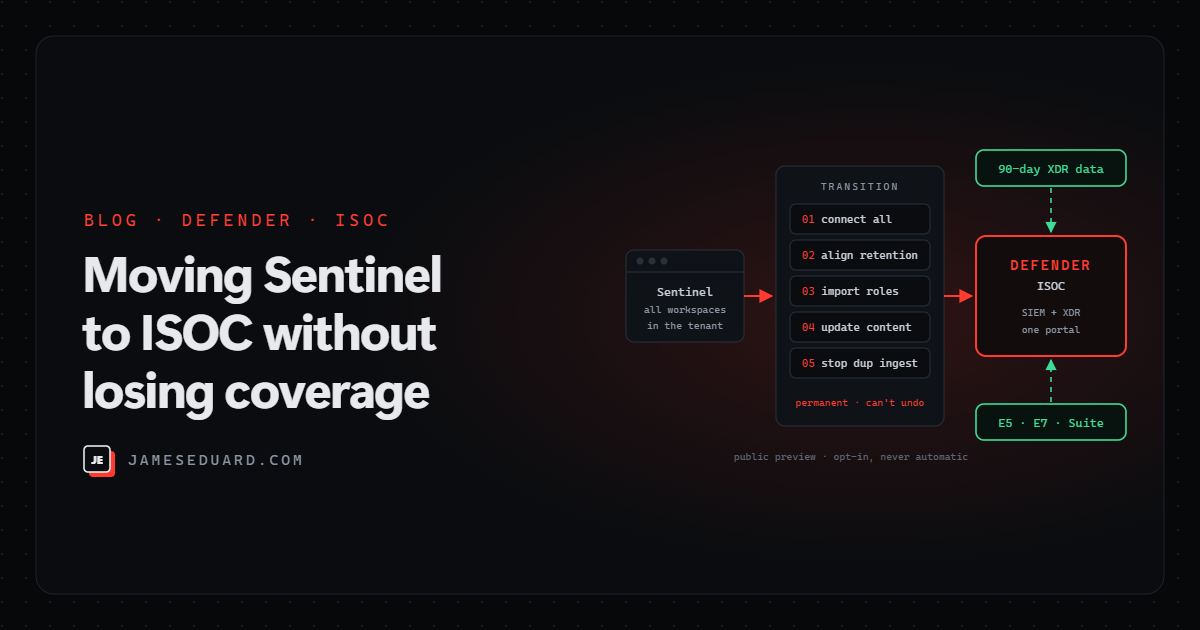
TL;DR: ISOC (Integrated Security Operations Center) puts SIEM and XDR together in the Microsoft Defender portal for customers with Microsoft 365 E5, E7 or the Defender Suite. New customers can just start using it. Existing Sentinel customers can opt in, but read the fine print first: the move is tenant-wide and permanent, negotiated Sentinel discounts and commitment tiers don’t carry over, and the 5 MB per user per day Microsoft 365 data benefit doesn’t apply. Done in the right order (connect, align retention, import roles, update content, then stop duplicate ingestion), you keep full coverage and can stop paying twice for Defender data.
I covered the Ignite 2026 Sentinel announcements in a separate post. This one goes deeper into ISOC itself: what you get with and without a workspace, how retention and billing work, and the exact order to move an existing Sentinel deployment across without creating detection gaps. Everything here is from Microsoft Learn as of 19 November 2026, and ISOC is still in public preview, so expect details to move.
What ISOC is (and isn’t)
ISOC brings Defender XDR, SIEM features from Sentinel, threat intelligence, automation and AI agents into the Defender portal, so analysts work one queue with one set of signals. Microsoft is clear that it is not a standalone product: it’s a feature benefit of Microsoft Defender Suite, Microsoft 365 E5 and Microsoft 365 E7.
- No Sentinel today? You can start using ISOC directly in the Defender portal.
- Already on Sentinel? You can choose to transition. Nobody is moved automatically.
What works without a workspace
A nice change: a lot of SOC tooling now works at tenant level, before you create any Log Analytics workspace. You only need an ISOC workspace when you bring in extra data or need workspace features.
| Capability | Needs an ISOC workspace? |
|---|---|
| Case management | No |
| Natural-language playbook generation | No |
| Enhanced automation rules | No |
| SOC optimization | No |
| Content hub and CI/CD (repositories) | Only for workspace-level content; Defender-level content deploys at tenant scope |
| UEBA | Yes |
| Threat intelligence | Yes |
| Azure and third-party data (500+ connectors) | Yes |
To create the workspace you need an Azure subscription, the Security Administrator role in Entra ID, and either Owner on the subscription or User Access Administrator plus Microsoft Sentinel Contributor. The workspace follows normal Log Analytics data residency, so pick the region deliberately.
Retention and billing, in plain terms
- Defender data is included. Data from Defender for Endpoint, Office 365, Identity, Cloud Apps, Cloud and Entra lives in Defender and doesn’t need to be ingested into a workspace.
- 90 days included for supported Defender tables from 15 November 2026 (for example
DeviceProcessEvents,EmailEvents,IdentityLogonEvents,CloudAppEvents,EntraIdSignInEvents,AlertInfo). Defender for Cloud tables reach a full 90-day history by about 3 January 2027. - Up to 180 days if you extend, at extra cost. Anything between 90 and 180 days is billed at the 180-day rate, and extended retention isn’t backfilled, so turn it on before you need it.
- Other data is billed separately. Third-party and non-Defender Microsoft data goes through the workspace, with up to 90 days in the ISOC ingestion experience; use data lake retention for long-term audit and compliance.
Heads-up: at the time of writing, the ISOC overview page still says eligible customers get 30 days of included Defender retention “during this phase of the preview”, while the billing and transition pages (and the Ignite announcement) say 90 days from 15 November 2026. Check what your tenant actually shows before you plan around it.
Already on Sentinel? Read this before you opt in
- It’s all or nothing. The transition converts every Sentinel workspace in the tenant. A mix of ISOC and non-ISOC workspaces isn’t supported.
- It’s permanent. There is no rollback.
- Early data lake customers are blocked. If you onboarded to the Sentinel data lake before 23 September 2026, you can’t opt in yet.
- Your invoice changes. ISOC meters replace Sentinel meters. Negotiated Sentinel discounts don’t carry over, there are no commitment tiers, and the Microsoft 365 benefit of 5 MB per user per day doesn’t apply. If you use a dedicated cluster, ISOC usage doesn’t count toward that commitment, and unused commitment is still charged.
In other words: talk to your Microsoft account team about pricing before you click anything. For a heavily discounted Sentinel deployment on a commitment tier, the maths can go either way.
Step 0: measure what you pay for Defender data today
The main saving in ISOC is not ingesting Defender XDR tables into Sentinel any more. This query shows how much of your billable ingestion over the last 30 days comes from those tables, which is roughly what you stop paying for once duplicate ingestion is switched off:
// Billable GB from Defender XDR tables vs everything else, last 30 days
Usage
| where TimeGenerated > ago(30d) and IsBillable == true
| extend Source = iff(DataType matches regex
      @"^(Device\w+|Email\w+|Identity\w+|CloudAppEvents|UrlClickEvents|Alert(Info|Evidence))$",
      "Defender XDR tables", "Other data")
| summarize GB = round(sum(Quantity) / 1024, 2) by Source, DataType
| order by Source asc, GB desc
Then compare the rest (“Other data”) against ISOC ingestion pricing, and do the same for any table you keep longer than 90 days.
The transition, in the right order
1. Connect every Sentinel workspace to the Defender portal. In the Defender portal, go to System › Settings › Microsoft Sentinel › Connect a workspace, connect all of them and choose the primary workspace. You need User Access Administrator, or Microsoft Sentinel Contributor with subscription Owner; onboarding a primary workspace in a multi-workspace setup needs Global Administrator or Security Administrator.
2. Align table retention. ISOC supports specific retention values. Tables set to something like 120 or 150 days should move to a supported value such as 90 or 180 days (Setup & configuration › Data management › Data & connectors › Tables). This avoids billing surprises. Decide now which Defender tables you want to keep in the workspace: tables with analytics retention of 180 days or more stay ingested in step 5.
3. Import Sentinel roles into Defender RBAC, then activate the workloads. Sentinel role assignments don’t move on their own. Use Import roles during onboarding, fix any import errors, then Activate workloads: imported roles do nothing until Defender RBAC is active for that workload. For secondary workspaces with Defender tables, assign roles manually. Skip this and analysts lose access on day one.
4. Move your content to Defender data, table by table. In SOC optimization, look at the Lower Defender data costs recommendations. The preview migration tool converts eligible analytics rules into Defender custom detections. Run both side by side while you validate, with an alert tuning rule auto-resolving the duplicate alerts from the custom detection, and re-create any health monitors as custom detections. Update workbooks, playbooks, DCR transformations, exports and CI/CD pipelines that reference the old tables. Fields you added with _CF transformations need to be calculated in the query instead, and exports move to Defender’s streaming API.
5. Only then, stop duplicate ingestion. Configure workspace on the Tables page stops ingestion for all supported Defender tables in that workspace at once (except those with 180+ days analytics retention). You can’t do it one table at a time, which is why step 4 has to be finished first. Repeat per workspace.
6. MSSP-managed? Check Microsoft’s MSSP transition guidance first: delegation and deployment change, and CI/CD repositories are the clean way to push the same content to every customer tenant.
Validate before you switch anything off
For each table, before step 5, confirm that advanced hunting queries return what you expect, detections fire, workbooks show real data, playbooks run, users and automation identities still have access, and pipelines point at the right tables. A quick way to spot rules still pointing at workspace copies of Defender tables is to search your exported rules or repository for DeviceProcessEvents, EmailEvents, IdentityLogonEvents and friends, and check each hit has a Defender-side replacement.
Should you move now?
- Yes, start now if you have E5/E7 and no SIEM yet, or a small Sentinel deployment that mostly ingests Defender data. Case management, automation and SOC optimization at tenant level are a quick win.
- Plan, then move if you have a large Sentinel estate, lots of custom analytics rules, or MSSP delegation. Do steps 1 to 4 over a few weeks.
- Wait if you depend on deep Sentinel discounts or a commitment tier until the pricing is clear, or if you’re one of the early data lake customers who can’t opt in yet.
Either way, the Azure portal deadline for Sentinel (31 March 2027) means the Defender portal is where you’ll be working, so steps 1 and 3 are worth doing now whatever you decide about ISOC.
Checklist
- ☐ Confirm licences: Microsoft 365 E5, E7 or Defender Suite.
- ☐ Check you didn’t onboard to the Sentinel data lake before 23 September 2026.
- ☐ Run the Step 0 query and get an ISOC price from your account team, including discounts.
- ☐ Connect all Sentinel workspaces to the Defender portal and pick the primary.
- ☐ Move tables off unsupported retention values (e.g. 120 or 150 days).
- ☐ Import roles, activate Defender RBAC workloads, spot-check analyst access.
- ☐ Migrate analytics rules to custom detections and validate side by side.
- ☐ Update workbooks, playbooks, DCRs, exports and pipelines.
- ☐ Turn on extended retention for anything you need beyond 90 days (it isn’t backfilled).
- ☐ Select Configure workspace only when every table is validated.
References
- Microsoft Learn: ISOC in Microsoft Defender
- Microsoft Learn: Data ingestion, retention and billing for ISOC
- Microsoft Learn: Transition an existing Microsoft Sentinel deployment to ISOC
- Microsoft Learn: SOC optimization recommendations for ISOC
- Microsoft Learn: Create an ISOC workspace
- Microsoft Partner Center: November 2026 announcements
Based on Microsoft Learn documentation as of 19 November 2026. ISOC is in public preview; features, retention and pricing can change, so confirm against the current docs and your agreement before you transition.