pir8g33k
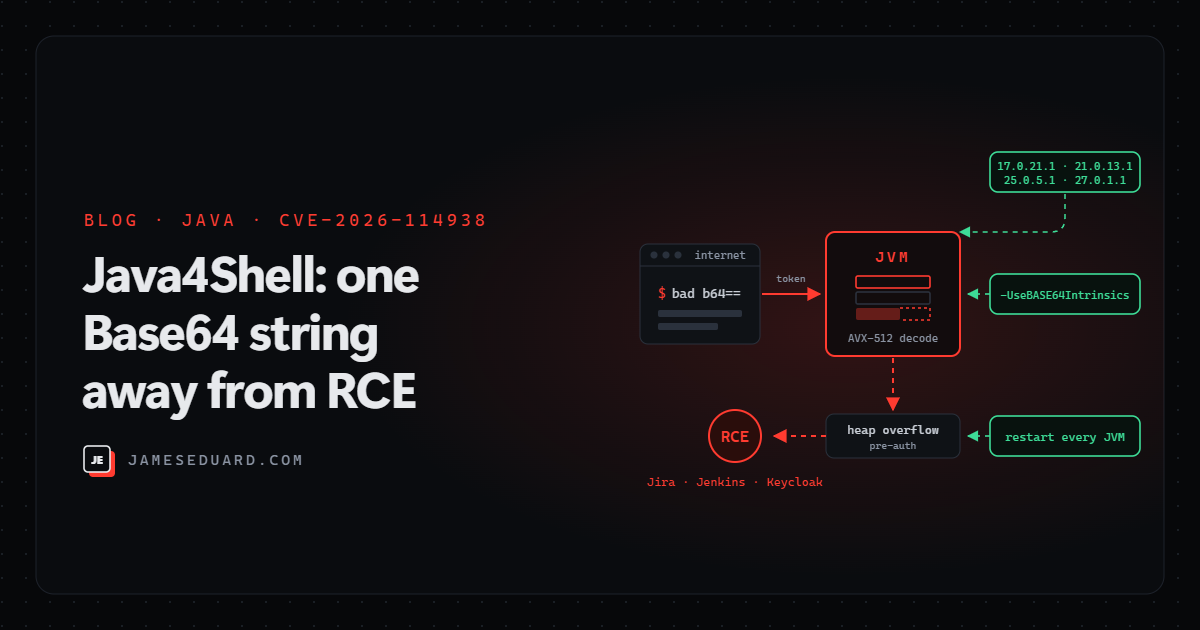
TL;DR: Java4Shell (CVE-2026-114938) is a heap overflow in the AVX-512 Base64 decoder of OpenJDK’s HotSpot JVM, disclosed and patched on 17 November 2026. It affects Java 17.0.6 and later, 21, 25 and 27 on x86-64 CPUs with AVX-512 VBMI, and researchers turned it into pre-auth RCE on default installs of Keycloak, Jira, Confluence, Jenkins, Artifactory and PingFederate. Move to 17.0.21.1 / 21.0.13.1 / 25.0.5.1 / 27.0.1.1 (or your vendor’s fixed build) and restart every JVM. If you can’t, start Java with -XX:-UseBASE64Intrinsics.
Java is everywhere you don’t look: your identity provider, your CI server, your wiki, your artifact repository, your search cluster, plus every appliance and container image that quietly bundles its own JRE. That’s why this bug got a “Shell” name. Here’s what it is, how to find out which of your hosts are exposed, and what to do today.
What Java4Shell is
Java4Shell is the name the research team at Calif gave to CVE-2026-114938. Oracle and the OpenJDK Vulnerability Group published fixes on 17 November 2026, and CISA and the Canadian Cyber Centre issued alerts the same day.
The bug lives in hand-written assembly that HotSpot uses to speed up Base64 decoding with AVX-512 instructions. A short, malformed Base64 string makes the length calculation underflow, and the fast path writes past the end of its output buffer on the Java heap before Java gets a chance to reject the input. That heap corruption can crash the JVM, leak heap memory (Calif calls this side “JavaBleed”: keys, tokens and personal data) or, with a product-specific chain, run code.
Severity depends on who you ask: Oracle scores it 8.1 (CVSS 3.1), Calif 9.2 (CVSS 4.0), and Red Hat rates it Critical. The real-world answer is “critical if a Java service on an affected CPU decodes Base64 from the internet”, which is a lot of them.
Am I affected? Three conditions
You need all three for the vulnerable code path to run:
| Condition | Affected | Not affected |
|---|---|---|
| Java version | OpenJDK-based 17.0.6 and later, 21, 25, 27 (any vendor) and Oracle Java SE 8 Enterprise Performance Pack 8u511b33-perf | Standard Java 8 and 11, builds older than 17.0.6, builds with the fix |
| JVM | HotSpot on x86-64 | ARM64 (Graviton, Ampere, Apple silicon) |
| CPU | AVX-512 VBMI: Intel Xeon Ice Lake, Sapphire Rapids, Emerald Rapids, Granite Rapids; AMD EPYC/Ryzen Zen 4 and newer | x86-64 CPUs without AVX-512 VBMI |
One trap: end-of-life Java 18–20, 22–24 and 26 share the same code and will not get a fix. If you find any of those, the only way out is to move to a supported LTS line.
How the attack works
Base64 is decoded all over a typical Java web app: HTTP Basic auth headers, JWTs and SAML tokens, API payloads, file uploads. Much of that runs before authentication. So the attack path is short:
- Step 1: an attacker sends a request whose Base64 field is malformed in a specific way.
- Step 2: the AVX-512 decoder writes a few dozen bytes past the end of its buffer on the heap, corrupting whatever object sits next to it.
- Step 3: with a chain built for that product’s memory layout, the corruption becomes code execution as the Java service account, or at least a heap leak or a crash.
There’s no universal exploit: each product needs its own chain. Calif reports unauthenticated RCE in default configurations of Keycloak, Jira, Confluence, Artifactory, Jenkins and PingFederate, and authenticated RCE in Kafka, Solr, Elasticsearch, Gerrit and Spinnaker. Wiz says it proved remote exploitation against Jenkins, Confluence and Tomcat. Calif also notes a Java client that connects over TLS to a malicious server can be hit, so this isn’t only a server problem.
Is anyone exploiting it?
As of 18 November there was no confirmed successful exploitation, and the CVE was not on CISA’s KEV list. But the clock is short:
- GreyNoise is seeing exploitation attempts and scanning from a public version checker, with no confirmed intrusions so far.
- VulnCheck says a working RCE exploit has been available to its customers since the evening of 17 November.
- Wiz says its AI research harness built a working PoC in about two hours.
- Calif published a trigger test that reproduces the memory corruption (not code execution), and unverified “exploit” repos are appearing on GitHub. Don’t run those on anything you care about.
Step 1: check whether you’re exposed
Start with the CPU. On Linux, if all four flags print, the host can run the vulnerable path. Use this to prioritise, not to rule hosts out: VMs and containers move between CPU generations.
# all four printed = AVX-512 VBMI path is available
grep -m1 '^flags' /proc/cpuinfo | tr ' ' '\n' | grep -E '^(avx512f|avx512bw|avx512vbmi|bmi2)$'
Then find every Java runtime, not just the one on the PATH. Products like Jira, Confluence, Jenkins and Keycloak often ship their own.
# Linux: running JVMs and the binary each one uses
ps -eo pid,user,args | grep -E '[j]ava( |$)'
for p in $(pgrep -x java); do echo "$p $(readlink -f /proc/$p/exe)"; done

# version of each runtime found
java -version 2>&1
/path/to/bundled/jre/bin/java -version 2>&1

# container images
docker run --rm --entrypoint java <image> -version
# Windows (PowerShell): list java.exe files and their versions
Get-ChildItem -Path C:\ -Filter java.exe -Recurse -ErrorAction SilentlyContinue |
ForEach-Object { "{0} {1}" -f $_.VersionInfo.ProductVersion, $_.FullName }If you run Microsoft Defender for Endpoint, Defender Vulnerability Management can do the inventory for you once the CVE is in its feed:
DeviceTvmSoftwareVulnerabilities
| where CveId == "CVE-2026-114938"
| summarize Devices = dcount(DeviceId) by SoftwareVendor, SoftwareName, SoftwareVersion
| order by Devices desc
Step 2: patch, then restart every JVM
Fixed builds as of 18 November. Distro and vendor builds use their own numbering, so check their advisories for the exact package:
| Distribution | Fixed in | Status on 18 Nov |
|---|---|---|
| Oracle Java SE / OpenJDK | 17.0.21.1, 21.0.13.1, 25.0.5.1, 27.0.1.1; 8u513-perf (EPP) | Released 17 Nov |
| Microsoft Build of OpenJDK | 17.0.21.1, 21.0.13.1, 25.0.5.1 | Released 18 Nov |
| Amazon Corretto | 17.0.21.1.2, 21.0.13.1.2, 25.0.5.1.2, 27.0.1.1.4 | Released; Docker tags unchanged, re-pull |
| Azul Zulu | 17.0.21.1, 21.0.13.1, 25.0.5.1, 27.0.1.1 | Released |
| Eclipse Temurin | 17.0.21.1+2, 21.0.13.1+2, 25.0.5.1+2, 27.0.1.1+4 | Rolling out; 17 still pending |
| Red Hat, Ubuntu | Not yet | Rated Critical/High, errata pending |
| Debian | 17.0.21.1+2-1 etc. | Unstable only; stable still vulnerable |
| Java 18–20, 22–24, 26 | No fix | End of life: migrate |
The step people skip: a running JVM keeps the old code until it restarts. Updating the package on disk changes nothing for a Jenkins controller that’s been up for 90 days.
# example: after updating the runtime, restart the service and confirm
sudo systemctl restart jenkins
for p in $(pgrep -x java); do echo "$p $(readlink -f /proc/$p/exe)"; done
java -version 2>&1 | head -1
Also on the list: rebuild container images that bundle Java (pulling a new base image doesn’t update running pods), and chase vendors for appliances and products that ship their own JRE.
Step 3: can’t patch today? Contain it
Calif, VulnCheck and Qualys all point to the same JVM flag, which turns off the fast Base64 decoder. It takes effect only after a restart, may slow down Base64-heavy workloads, and doesn’t replace the patch:
# preferred stopgap (VulnCheck tested it on 17, 21 and 25 with the unlock flag)
-XX:+UnlockDiagnosticVMOptions -XX:-UseBASE64Intrinsics

# alternative: disable AVX-512 entirely (x86-64 only - the JVM won't start on ARM)
-XX:UseAVX=2

# one way to apply it to every JVM a service starts
export JAVA_TOOL_OPTIONS="-XX:+UnlockDiagnosticVMOptions -XX:-UseBASE64Intrinsics"
Test before rolling either flag out widely; neither source tested OpenJDK 27. While you test, cut the exposure:
- Put internet-facing Keycloak, PingFederate, Jira, Confluence, Jenkins and Artifactory behind a VPN or an access proxy (Entra application proxy, Zero Trust gateway) until they’re patched.
- Don’t count on input validation, size limits or reverse-proxy buffering: the malformed input is tiny. WAF rules help with known payloads but can’t cover every code path.
- Patch in this order: internet-facing identity providers, then internet-facing Jira/Confluence/Jenkins/Artifactory, then anything else that handles logins, tokens or uploads, then internal services.
Checklist
- ☐ Inventory every Java runtime: servers, bundled JREs, container images, appliances, CI agents and developer tools.
- ☐ Mark hosts with all four CPU flags (
avx512f avx512bw avx512vbmi bmi2) as top priority. - ☐ Update to 17.0.21.1 / 21.0.13.1 / 25.0.5.1 / 27.0.1.1 or the vendor’s fixed build, then restart.
- ☐ Where you can’t, set
-XX:-UseBASE64Intrinsics, restart, and give it a removal date. - ☐ Take identity, build and collaboration consoles off the open internet until patched.
- ☐ Find and retire any Java 18–20, 22–24 or 26.
- ☐ Rebuild and redeploy container images that bundle Java.
- ☐ Watch for unexpected JVM crashes (
hs_err_pid*.logfiles), Java processes spawning shells and new outbound connections from Java services. If an unpatched service was exposed, review it and rotate its secrets.
References
- Calif: Java4Shell technical write-up
- OpenJDK Vulnerability Advisory, 17 November 2026
- Oracle Critical Security Patch Update, November 2026
- Red Hat: CVE-2026-114938
- Microsoft Build of OpenJDK release notes
- Censys advisory
- Qualys: how to find, mitigate and patch Java4Shell
- Wiz: CVE-2026-114938 RCE in OpenJDK
- Tenable: Java4Shell FAQ
- Cycode: fixed builds by vendor
Details are current as of 19 November 2026. Red Hat, Ubuntu, Debian stable and Temurin 17 fixes were still pending, and exploitation status can change quickly. I’ll update this post as they land.