pir8g33k
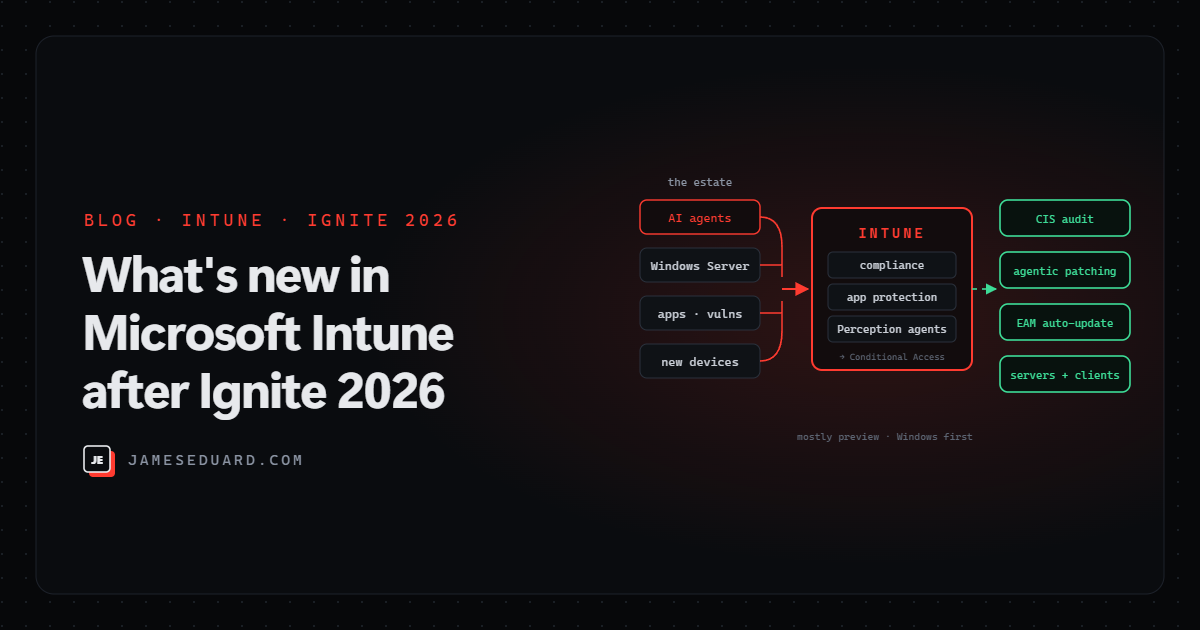
TL;DR: Intune’s Ignite 2026 story is about AI agents on endpoints, agentic patching and Windows Server in Intune. The things you can try this month: a software compliance policy that blocks devices running unsanctioned AI agents (public preview), app protection policies for Copilot, GitHub Copilot, Claude and ChatGPT, CIS benchmark auditing in Advanced Analytics (public preview), and device-level app inventory (public preview). Windows Server management is in Insider preview, and the Vulnerability Remediation Agent is in limited preview.
Microsoft published What’s new in Microsoft Intune at Microsoft Ignite on 17 November 2026. Below is what each announcement does, how ready it is, and what I’d do with it as an Intune admin. The post focuses on Windows and Windows Server; macOS, iOS, Android and Linux don’t feature this time.
At a glance
| Announcement | Status | Platform |
|---|---|---|
| Software compliance policy (block unsanctioned AI agents) | Public preview | Windows |
| App protection policies for AI apps | Not stated | Apps with the Intune SDK |
| Microsoft Execution Containers (MXC) policies | Rolling out | Supported agents |
| Vulnerability Remediation Agent | Limited public preview | Windows apps and OS |
| Windows Server management in Intune | Insider preview | Windows Server |
| Device-level app inventory | Public preview | Windows |
| EAM automatic updates expansion | Private preview | Windows |
| App in-use detection | Private preview | Windows |
| CIS benchmark auditing (Advanced Analytics) | Public preview, November | Windows |
| AI-powered Perception experience + custom reports | Limited public preview | Intune admin center |
| Remote Help diagnostic data reports | Not stated | Windows |
| Autopilot device preparation with Company Portal | Limited public preview | Windows |
1. Putting guardrails on AI agents
This is the part security teams will care about most. Three pieces work together:
- Software compliance policy (public preview, Windows). Mark a Windows device noncompliant when it runs an agent you haven’t sanctioned. Conditional Access then blocks corporate resources, and the user is told to remove it. Agents are identified through Microsoft Agent 365 (using Defender, Entra and Intune signals), and restricted apps are matched by MSI product code.
- App protection for AI apps. Microsoft Copilot, GitHub Copilot, Anthropic Claude and OpenAI ChatGPT now include the Intune SDK, so your existing app protection policies (copy/paste, save-as, data transfer) can apply to them.
- Microsoft Execution Containers (MXC) policies (rolling out). Set file and network access limits for supported agents that run inside MXC containers.
Before you build a block list, find out what’s already out there. This Microsoft Graph PowerShell snippet lists AI-related apps Intune has discovered on managed devices, with device counts. Adjust the name pattern to your environment:
# Requires the Microsoft.Graph module
Connect-MgGraph -Scopes "DeviceManagementManagedDevices.Read.All" -NoWelcome

$pattern = 'ChatGPT|Claude|Copilot|Ollama|LM Studio|Cursor|Gemini'

Get-MgDeviceManagementDetectedApp -All |
    Where-Object { $_.DisplayName -match $pattern } |
    Sort-Object DeviceCount -Descending |
    Select-Object DisplayName, Version, Platform, DeviceCount |
    Format-Table -AutoSize
Agree a sanctioned list with security and legal first, pilot the compliance policy on a test group, put the matching Conditional Access policy in report-only mode first, and only then enforce it. Blocking a tool half the company already uses, with no warning, is a fast way to create shadow IT.
2. Patching with agents
The Vulnerability Remediation Agent (limited public preview) combines Defender’s vulnerability data with Intune’s device and app context to build and run remediation playbooks that automate app and OS patching. It’s available in the Intune admin center and in Microsoft Perception as the “Reduce Risk Exposure” playbook, alongside other Perception agents for risk reduction and shielding.
Treat it like any automation that changes production: start with a small, low-risk device group, review the playbook it proposes, and keep your normal change approval in the loop until you trust its choices.
3. Windows Server comes into Intune
In Insider preview, Intune can now manage eligible Windows Server machines, including edge and branch servers and persistent virtual desktop sessions: configuration, app deployment and compliance, with Windows Autopatch handling updates across servers and clients. Azure Arc stays for infrastructure governance.
For many shops this could finally retire the “servers in Configuration Manager or GPO, clients in Intune” split. It’s an Insider preview, so use lab or non-critical branch servers, and keep Arc and your existing patching in place for now.
4. Better app visibility and less packaging
- Device-level app inventory (public preview): richer app details and inventory reporting per device.
- Enterprise App Management automatic updates (private preview): automatic updates expand to more verified Windows apps, including apps IT didn’t deploy, with new EAM update policies so you don’t need a separate package or policy per app.
- App in-use detection (private preview): spots running apps that block an install, and lets you report it or close the process, with or without telling the user.
The EAM change is the big one for patching hygiene: user-installed apps like browsers, PDF readers and runtimes are usually where the oldest, most-exploited versions hide.
5. CIS benchmark auditing
Intune Advanced Analytics adds CIS benchmark auditing (public preview, November) next to the existing DISA STIG auditing. You get per-check results by device group, and it only audits: it doesn’t change device settings. That makes it a safe first step: run it against your current baseline, see where you drift from CIS, then fix it with settings catalog or security baseline policies.
6. Perception, reporting and the day-to-day
- AI-powered Microsoft Perception experience (limited public preview): ask a plain-language question and it runs a multi-step investigation, showing each step and the underlying queries.
- Custom reports: save Perception results as reports with charts, and add the affected devices or users straight to a group, which is handy for targeting a fix.
- Faster data: device data moves closer to real time, Windows app inventory and policy reporting get quicker, timestamps show how fresh the data is, and registry key and file inventory are new.
- Remote Help diagnostic data reports: more device context during a Remote Help session on Windows.
- Autopilot device preparation (limited public preview): after OOBE, Company Portal opens and shows compliance and app install status in a non-blocking view, so users stop asking “is it done yet?”.
A note on licensing
Microsoft’s post doesn’t cover licensing. Several of these build on features that have so far been sold as Intune add-ons or as part of the Intune Suite, such as Advanced Analytics, Enterprise App Management and Remote Help, and Perception and the agents have their own onboarding. Check what your tenant includes before you plan a rollout around any of them.
What I’d do this month
- ☐ Run the Graph snippet above and agree a sanctioned AI app list with security and legal.
- ☐ Pilot the software compliance policy for unsanctioned agents on a test group, with Conditional Access in report-only first.
- ☐ Extend your app protection policies to Copilot, GitHub Copilot, Claude and ChatGPT.
- ☐ Turn on CIS benchmark auditing in Advanced Analytics and compare results with your baseline.
- ☐ Try device-level app inventory and look for old, user-installed apps.
- ☐ Join the Windows Server Insider preview with a lab or low-risk branch server.
- ☐ Ask for the Vulnerability Remediation Agent and Autopilot device preparation previews if you want an early look.
- ☐ Confirm licensing for Advanced Analytics, EAM, Remote Help and Perception.
References
- Microsoft: What’s new in Microsoft Intune at Microsoft Ignite
- Microsoft: Windows Server management in Intune (preview)
- Microsoft: Perception for IT
- Microsoft: Remote Help diagnostic data
- Microsoft Learn: Get-MgDeviceManagementDetectedApp
Details are as announced on 17–18 November 2026. Preview features can change before general availability; check the Intune admin center and Microsoft Learn for current status.