pir8g33k
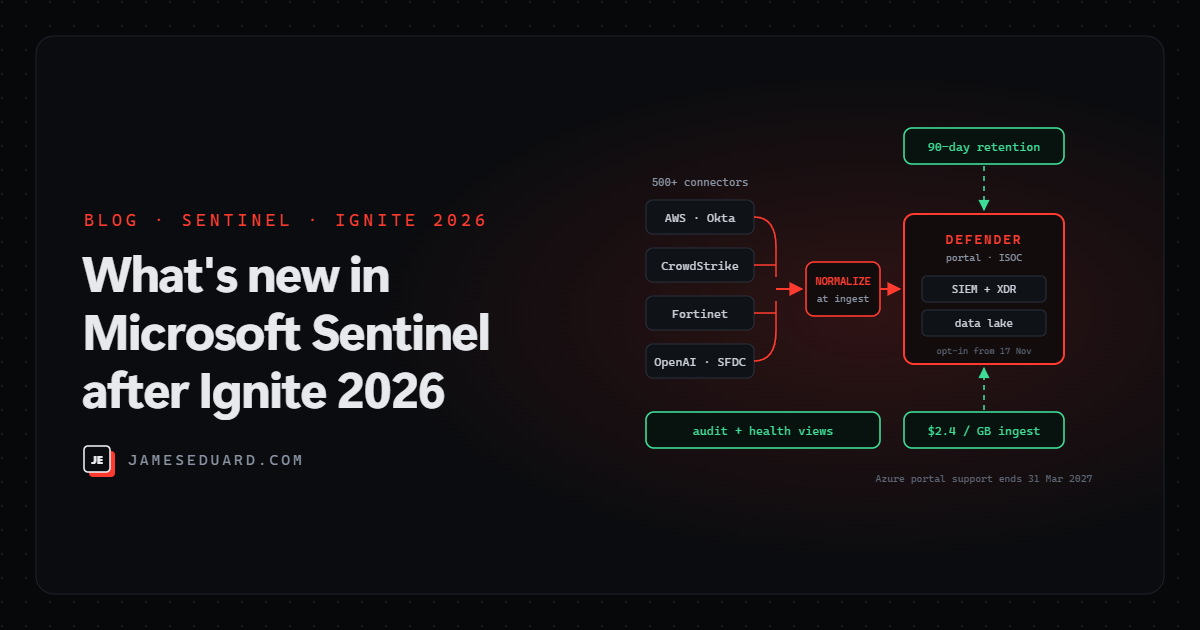
TL;DR: Microsoft’s Ignite 2026 Sentinel news is mostly about moving Sentinel into the Defender portal and making data cheaper and cleaner. The headline: if you have Microsoft 365 E5, E7 or the Defender Suite, you can opt in to the Integrated Security Operations Center (ISOC) from 17 November 2026, with 90 days of Defender data retention and ingestion at $2.4 per GB. Also new: an audit log for automation, ingest-time normalization (preview in December), an AI connector builder in VS Code, and a connector health dashboard. And the clock is ticking: Sentinel support in the Azure portal ends on 31 March 2027.
Microsoft published its Ignite 2026 Sentinel round-up on 17 November. Here’s what each announcement actually changes for the people running a SOC, what’s ready now versus still in preview, and what I’d do about it this month.
The announcements at a glance
| What | Status | Why it matters |
|---|---|---|
| Integrated SOC (ISOC) for Sentinel customers | Opt-in from 17 Nov 2026 (E5, E7, Defender Suite) | SIEM and XDR in one place, 90-day Defender retention, $2.4/GB ingestion, built-in data lake |
| Audit logs for automation | Public preview | Who created, changed, enabled, disabled or deleted an automation rule or playbook |
| 500+ data connectors | Rolling out | New sources incl. Edge for Business, Purview Information Protection, CrowdStrike, Wiz, Salesforce and OpenAI audit logs |
| Ingest-time normalization | Public preview, December 2026 | Data is normalized as it arrives, so queries get simpler and faster |
| Connector Builder Agent in VS Code | GA by end of November 2026 | AI-assisted building, validation and deployment of custom connectors |
| Data & Connectors overview in Defender | Public preview | Connector health, ingestion volume and latency across Analytics and Data Lake tiers |
| On-premises pipeline monitoring | Not stated | Health and performance of Azure Monitor pipeline log forwarders |
1. ISOC: Sentinel and Defender become one SOC
The Integrated Security Operations Center brings Sentinel’s SIEM and Defender’s threat protection together in the Defender portal. Starting 17 November 2026, existing Sentinel customers on Microsoft 365 E5, Microsoft 365 E7 or Microsoft Defender Suite can opt in. What you get:
- 90 days of retention for eligible Defender data, up from 30.
- Ingestion at $2.4 per GB across the 500+ connectors.
- SIEM and XDR incidents, hunting and response in the same portal.
- A built-in data lake for long-range hunting, investigations and compliance.
It’s optional: you can keep running Sentinel exactly as you do today. My take: the retention jump alone is worth the evaluation, because 30 days of Defender data is often not enough for an incident you only discover weeks later. Before opting in, check your licences, compare the $2.4/GB rate against what you pay now, and test your existing analytics rules and playbooks in the Defender portal.
2. Finally: an audit trail for automation
Automation rules and playbooks can close incidents, isolate machines and disable accounts, yet until now it was hard to answer “who changed this rule, and when?”. The new audit logs (public preview) record when automation rules and generated playbooks are created, edited, activated, deactivated or deleted. You can search, review and export them for compliance.
This closes a real gap. An attacker with SOC access who quietly disables the rule that would catch them is exactly the scenario this helps you spot. Turn it on, and add “automation rule disabled or deleted” to the list of changes someone reviews every week.
3. More data, and better context
The connector catalogue passes 500. New or expanded sources include Microsoft Edge for Business, Microsoft Copilot for government cloud, Microsoft Purview Information Protection, Dragon Copilot, CrowdStrike (API and RTEM), Wiz Push, Salesforce audit logs and OpenAI audit logs; the last one is handy if your company is rolling out ChatGPT Enterprise and someone asks you to watch it.
- Less infrastructure: more connectors move to the Codeless Connector Framework (CCF), and 85+ Azure Functions-based connectors are being modernised. Multi-instance support lets several source accounts feed one workspace with separate credentials.
- Cross-environment detection: high-value CrowdStrike detections can be promoted into Defender alerts, and expanded AWS and Okta signals extend attack disruption to more compromised-account scenarios.
- Behaviour analytics: Behaviors now supports Fortinet logs, and UEBA extends to AWS GuardDuty plus Check Point, Zscaler and Fortinet network data.
If you still run connectors on Azure Functions, check which of yours are on the modernisation list: fewer Function Apps means fewer secrets, fewer patching jobs and less to break.
4. Normalize once, at ingest
Today most normalization happens at query time: every hunt or rule runs parsers over raw data. From December 2026 (public preview), Microsoft-managed parsers can standardise selected data as it is ingested, so detections and hunts query data that is already normalised. Expect simpler KQL and faster queries, especially across multi-vendor sources such as firewalls and identity providers. When the preview lands, start with one noisy, multi-vendor data type and compare query run times before and after.
5. Building and watching connectors
The Microsoft Sentinel Connector Builder Agent for VS Code goes GA by the end of November. It generates the schema, polling logic, connector UI and deployment assets for a custom connector, validates them, and lets you pick the AI model. If you’ve been putting off that one in-house app connector, this lowers the bar a lot. Still review what it generates before it goes near production: it’s your credentials and your data flowing through it.
The new Data & Connectors overview tab in the Defender portal (public preview) shows connector health, ingestion volumes and trends across the Analytics and Data Lake tiers, so you can spot a broken connector or a table that suddenly went quiet. For on-premises sources, Microsoft is adding health and performance monitoring for Azure Monitor pipeline log forwarders.
Until the overview tab reaches your tenant, these two queries cover most of the same ground. The first lists tables whose ingestion in the last 24 hours fell more than 50% below their 7-day daily average; the second shows connector failures from the health table (enable the Sentinel health feature first).
// Tables that ingested much less in the last 24h than their 7-day daily average
Usage
| where TimeGenerated > ago(8d) and IsBillable == true
| summarize Last24hMB = sumif(Quantity, TimeGenerated > ago(1d)),
            Prev7dMB  = sumif(Quantity, TimeGenerated <= ago(1d))
    by DataType
| extend DailyAvgMB = Prev7dMB / 7.0
| extend ChangePct = round((Last24hMB - DailyAvgMB) / DailyAvgMB * 100, 1)
| where DailyAvgMB > 1 and ChangePct < -50
| order by ChangePct asc
// Data connector failures in the last 24 hours
SentinelHealth
| where TimeGenerated > ago(1d)
| where SentinelResourceType == "Data connector" and Status != "Success"
| summarize Failures = count(), LastSeen = max(TimeGenerated),
Reason = take_any(Description)
by SentinelResourceName, Status
| order by Failures descThe date that matters most: 31 March 2027
Microsoft’s own resources section repeats the deadline: Sentinel support in the Azure portal ends on 31 March 2027. Every feature above lands in the Defender portal, so the real question isn’t whether you move but how soon. Microsoft has a planning guide for the move; four months is not long once you count change approvals, role mapping and retraining the team.
What I’d do this month
- ☐ Check licences: do you have Microsoft 365 E5, E7 or the Defender Suite? If so, plan an ISOC evaluation.
- ☐ Compare your current ingestion cost per GB with the $2.4/GB ISOC rate, using last month’s
Usagenumbers. - ☐ Onboard the workspace to the Defender portal if you haven’t, and test your analytics rules, automation and workbooks there.
- ☐ Turn on the automation audit logs and review rule changes weekly.
- ☐ List connectors still running on Azure Functions and check them against the CCF modernisation list.
- ☐ Add the OpenAI, Salesforce or Wiz connectors if those platforms are in your estate.
- ☐ Enable Sentinel health monitoring and schedule the two queries above until the overview tab arrives.
- ☐ Put 31 March 2027 in the team calendar, with a migration owner.
References
- Microsoft: Ignite 2026, what’s new in Microsoft Sentinel
- Microsoft Learn: Integrated Security Operations Center overview
- Microsoft Learn: Connector Builder Agent
- Microsoft Learn: Monitor data connector health
- Microsoft Learn: Multi-account CCF connectors
- Microsoft Learn: Plan your move to the Defender portal
Details are as announced on 17 November 2026. Preview features can change before general availability, and pricing and eligibility can vary by agreement, so confirm with Microsoft for your tenant.